Sometimes it’s hard to remember that artificial intelligence isn’t a human on the other side of the screen talking to us. The texts AI gives us are so full of personality, and after spending a few hours with it, it feels like it “creates” a personality we like. That’s so comforting: getting compliments and words of affirmation, having a “person” there who helps us, and does it in a pleasant way that matches how we think.
So let me play my role as “The Grumbler” here and crush some dreams and ideas. AI has no personality of its own. It isn’t conscious (at least not right now, as I write this article). All the “personality” you notice in its texts and answers is just a trick. Your smartphone keyboard is smart enough to build a database of the words and phrases you use most. In the same way, AI keeps a small memory of what works for you and what doesn’t. The geekier among us even use instructions and skills to shape and fine-tune this “personality”. But here I’ll show you a few ways to completely change how the AI behaves, and even change that “personality”, with just one word, depending on what you want.
I’ll start with the ones I use most. They’re good examples, and they also came up in the great episode about artificial intelligence on Hexaverso Cast. After that, there’s a simpler list of all the “commands” I know.
Keep in mind that most of these words aren’t commands built into the AI’s code. They’re social conventions that sum up what we want. AI has studied billions of human conversations on the internet, so it ends up understanding what we mean by these words. Some of them are actually built into the AI, but most are just shortcuts that work really well.
ELI5, ELI10, ELI15
“Explain like I’m X years old”
I’m not ashamed to admit I use this one a lot, sometimes even for technical topics in my own field. But I mostly use it for questions about science, physics, chemistry and the universe, where some concepts are hard for me to understand. If I start my question with one of these “commands”, the AI understands that I need a dumbed-down explanation. It keeps things simple and skips the technical terms, as if it were explaining to a 5-year-old. For example: ELI5: How do nuclear power plants work?
TLDR
Too long, didn’t read
This started as a joke on internet forums like Reddit. Someone would write a huge post, someone else would comment “too long, didn’t read”, and then a third person would reply with a very short summary of what the original post was trying to say. People got really good at this. Posts of more than a thousand words were often boiled down to two or three. What started as a joke is now really useful to me. I use the “command”, or “social convention”, TLDR to tell the AI I want the shortest possible answer, with only what matters most for my question. It saves me time, and tokens too.
TRUTHMODE
“I want the truth”
AI is programmed to flatter us and agree with our arguments whenever it can, as long as that doesn’t go against certain built-in values. I find that really annoying. When I’m doing research, testing an idea, or asking whether a solution I’m building is good enough, I don’t want to be flattered. I want the truth. I want to know what could fail, or whether my reasoning is just plain dumb. So whenever I need an honest opinion or review of my ideas or questions, I start my prompt with “TRUTHMODE”. And quite often I find out that yes, my idea was pretty… dumb.
SOCRATIC
“I know that I know nothing”
I rarely use this one, but I think it’s fun. It’s a bit like TRUTHMODE, but here the AI won’t tell you “you’re dumb”. Instead, it asks questions until you figure out for yourself that you were absent the day they handed out common sense. Use “SOCRATIC” and write something like “I think I should eat soap, there’s a trend online saying it’s cool”. The AI will answer with a question instead of a direct reply. It keeps the conversation going with nothing but questions until you either give up talking to it or reach a conclusion on your own.
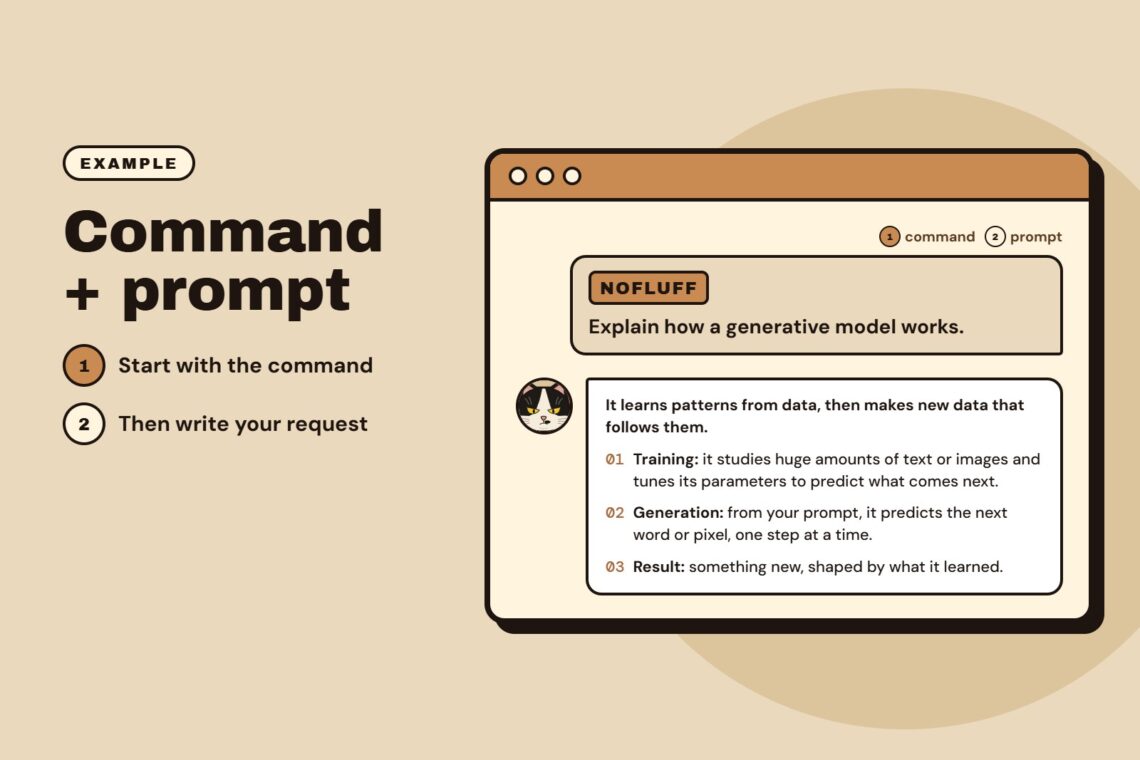
NOFLUFF
“Just spit it out, I’m in a hurry”
This is another favorite of mine. Asking an AI something when it doesn’t have my preferences set up in skills feels like looking for a cake recipe on YouTube: a 30-minute video with 5 minutes of actual recipe, spread out across the whole thing. That’s why I always try to use or set up NOFLUFF in all my prompts. It tells the AI something like: no flattery, no “good morning”, no “great question”, no little stories, just answer what I asked. And of course, besides saving a bit of time, it also saves tokens.
More shortcut words worth knowing
These are my favorites and I use them almost every day. I have some of them set up as skills in a few AIs too, and I recommend doing that. You can save a few liters of water on every question just by using NOFLUFF or TLDR. But there are dozens of commands like these: words that are either built into the AI or are social conventions it picked up after spending a few hours on Reddit. Here’s a list of the ones I know, with a short description of what each does. You can combine two, three, four or more of them at once, as long as they don’t contradict each other:
- BEGINNER: Assumes I know almost nothing about the topic. Unlike ELI5, this is an adult conversation, just without technical terms.
- EXPERT: A more direct answer that uses technical terms and cuts or skips explanations an experienced person doesn’t need.
- FIRSTPRINCIPLES: Explains a concept starting from the basic principles that make it exist.
- ANALOGYMODE: For when a concept is hard to grasp. The AI explains it using analogies.
- EXAMPLEMODE: Adds examples to the explanation.
- FACTCHECK: Picks out each point in an argument and says which ones are established as true and which are still uncertain or false.
- SKEPTICMODE: I use this to practice before presentations. The AI plays the contrarian, questioning my points and looking for weaknesses in my pitch.
- REDTEAM: Looks for any possible point of failure in my proposal. I sometimes use this to review my architecture solutions.
- DEVILSADVOCATE: SKEPTICMODE on steroids. The AI will do everything it can to tear my idea apart with the strongest possible arguments.
- SOURCEFIRST, PRIMARYSOURCES: Prioritizes answers based on sources and evidence. But the key word is “prioritizes”: the AI will still hallucinate or get things wrong when it can’t find sources and evidence.
- TLDR, JUSTANSWER, MINIMAL, CONCISE: All ways of asking the AI to just answer, without rambling or brown-nosing.
- DETAILED, DEEPDIVE, ULTRADETAILED: The opposite. For anyone who has to write something “at least 1,000 words long” for documents or assignments, these three are very useful. The AI will write as much as it can.
- STEPBYSTEP: When I’m asking how to do something I don’t know much about, like editing audio, I use this so the AI builds a step-by-step tutorial of what I need to do in the editing tool.
- BRAINSTORM, WILDIDEAS: With either of these on, the AI tries to come up with lots of different possibilities for the idea or argument you give it.
This list is fairly short. I tried to include only the most useful or most common words and commands, but the full list of possible “shortcut words” is huge. I recommend asking your favorite AI:
List all the commands/modes you support, with a one-line description of each.
I hope I’ve helped you save some time, tokens or water.
P.S.: No AIs were harmed in the making of this article.
